
Introduction
Why AI Tools Matter for Beginners
Many beginners feel confused or even intimidated when they hear the term “artificial intelligence.” AI is often described using complex language, technical examples, or advanced use cases that make it seem difficult to understand. For someone just starting, this can create the false impression that AI is only for programmers or technology experts.
In reality, modern AI tools are designed with beginners in mind. Most of today’s AI tools work through simple dashboards, clear buttons, and step-by-step guidance. Users do not need to write code, understand algorithms, or have any technical background. These tools focus on helping people complete everyday tasks more easily, such as writing, organizing information, creating simple visuals, or saving time on repetitive work.
This article helps beginners clearly understand what AI tools actually do and how they fit into online work and business. It explains AI in simple terms, shows how beginners can use these tools safely and realistically, and places AI within the broader context of technology and online business. By the end, readers should feel more confident and informed, not overwhelmed, and better prepared to explore the ideas explained further in Technology and Online Business – The Complete Beginner’s Guide.
Online Work Before AI Tools Existed

Before AI tools became common, online work looked very different for beginners. Most tasks required more time, more effort, and more trial and error. People depended heavily on manual work and basic software, which made learning slower and progress more difficult.
How Beginners Worked Before AI
In the past, beginners had to complete many tasks by hand. Writing content, organizing information, researching topics, and planning work all required manual effort. Simple actions, such as editing text or summarizing information, could take hours instead of minutes.
Learning was also slower. Beginners often relied on long tutorials, forums, or guesswork. Without smart assistance, mistakes were common, and fixing them took time. This reduced productivity and made online work feel overwhelming for many newcomers.
Access to helpful tools was limited as well. Many tools were expensive, complex, or designed for professionals. Beginners struggled to find resources that matched their skill level. As a result, starting online work required more patience and persistence than it does today.
This period shows why modern AI tools matter. They did not replace effort, but they reduced friction and removed many early barriers. Understanding this contrast helps beginners see how technology evolved, a topic explored more broadly in Technology and Online Business – The Complete Beginner’s Guide.
Common Challenges Beginners Faced
Before AI tools became widely available, beginners often struggled with complex software. Many programs were built for experienced users and used unfamiliar menus, settings, and features. This made even simple tasks feel difficult and frustrating for someone just starting out.
Learning curves were also steep. Beginners had to spend a lot of time watching tutorials, reading guides, or asking questions in forums before they could complete basic tasks. Progress felt slow, and mistakes were common, which reduced confidence and motivation.
In addition, many online tasks were time-consuming. Writing, editing, organizing information, and planning work required repeated manual effort. Without smart assistance, beginners had to invest more time just to achieve small results. These challenges made online work feel harder than it needed to be.
What AI Tools Mean in Simple Language

AI tools are often misunderstood because they are explained in technical ways. For beginners, it helps to look at AI tools as everyday helpers rather than advanced machines. When explained simply, AI becomes easier to understand and less intimidating.
What AI Tools Really Do (No Technical Jargon)
AI tools act as support tools, not replacements for human thinking. They help users complete tasks faster and more easily, but they do not make decisions on their own. A beginner still controls what to create, write, or organize.
These tools are especially useful for handling ideas, organization, and efficiency. For example, an AI tool can help suggest ideas, organize information, or clean up written text. This saves time and reduces effort, but the final work still depends on the user’s judgment and goals.
Why Beginners Can Use AI Without Experience
Modern AI tools are designed with simple interfaces. Buttons, menus, and options are clearly labeled, so users can understand what to do without prior training. Most tools guide users step by step, which makes learning easier.
Instructions are also clear and user-friendly. Beginners do not need to read long manuals or follow complex setup processes. In most cases, users can start working immediately by typing a request or choosing an option.
Another important reason AI tools are beginner-friendly is that no coding or technical setup is required. Users do not need programming knowledge, special software installations, or advanced settings. This makes AI tools accessible to anyone who is new to online work.
Key Technological Changes That Made AI Beginner-Friendly

Several important technology changes made AI tools easier for beginners to use. These changes removed technical barriers and turned AI into something practical for everyday online work.
Internet and Cloud-Based AI Tools
The growth of the internet made AI tools widely accessible. Today, most AI tools work online through the cloud. This means users do not need to install heavy software or powerful computers. Beginners can access AI tools directly through a web browser, from almost any device.
Cloud-based tools also update automatically. Beginners always use the latest version without worrying about downloads or maintenance. This simplicity makes starting much easier.
Software Platforms That Hide Technical Complexity
Modern software platforms are designed to hide technical details from users. Complex systems run in the background, while beginners see simple input boxes, buttons, and menus.
Instead of dealing with settings or configurations, users focus on what they want to achieve. This design approach allows beginners to use AI tools confidently without understanding how the technology works internally.
Automation Explained in Simple Terms
Automation means letting tools handle repetitive tasks. In simple terms, AI automation saves time by doing routine work automatically once a task is set up.
For beginners, this might include organizing information, formatting text, or generating simple suggestions. Automation reduces effort and helps users stay focused on learning and creativity rather than repetition.
Mobile Access to AI Tools
Another key change is mobile access. Many AI tools now work smoothly on smartphones and tablets. This allows beginners to use AI tools anytime and anywhere.
Mobile-friendly design makes AI tools more flexible and accessible. Beginners can practice, explore features, and complete tasks without needing a desktop computer or special setup.
Types of AI Tools Beginners Can Use Easily
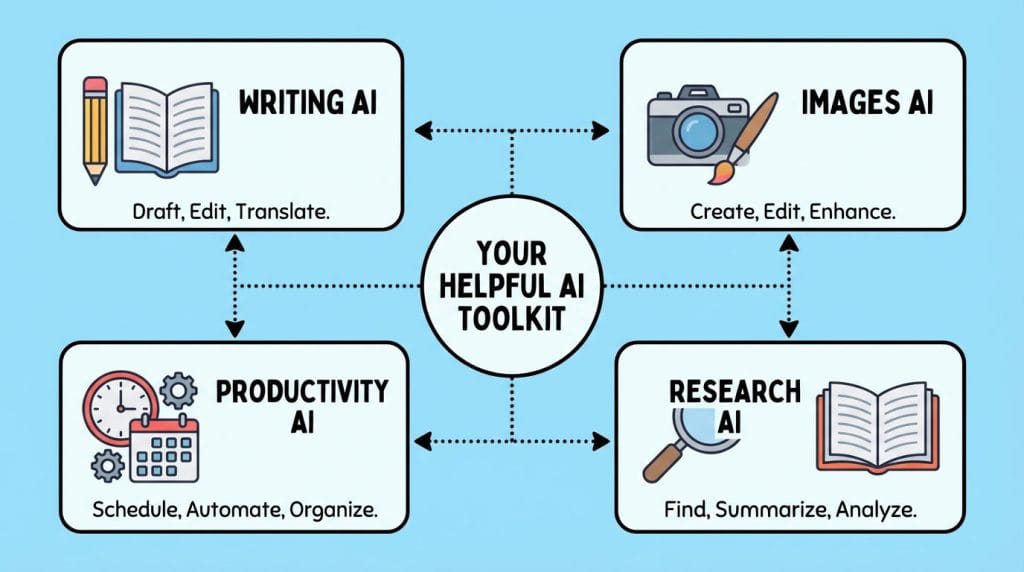
AI tools come in different forms, each designed to help with specific tasks. For beginners, the most useful tools are those that simplify everyday work and reduce mental effort. These categories show how AI supports common online activities without requiring technical knowledge.
AI Tools for Writing and Ideas
AI tools for writing help beginners express ideas more clearly. They can suggest topics, organize thoughts, and improve sentence structure. This makes writing less stressful, especially for those who are not confident writers.
These tools also support content planning. Beginners can outline articles, plan posts, or break large ideas into smaller steps. Editing and clarity support helps clean up grammar, tone, and flow, allowing users to focus on meaning rather than mechanics.
AI Tools for Images and Simple Design
Some AI tools focus on visual creation without requiring design skills. Beginners can generate simple images, illustrations, or visual concepts using short descriptions.
Image enhancement tools also help improve quality, resize visuals, or adjust basic elements. This allows beginners to create acceptable visuals for online use without learning complex design software.
AI Tools for Productivity and Organization
Productivity-focused AI tools help beginners stay organized. They assist with task planning by breaking work into manageable steps and reminding users what to do next.
Time management support helps prioritize tasks and reduce wasted effort. Workflow support tools make it easier to track progress and maintain focus, which is especially helpful for beginners working online for the first time.
AI Tools for Research and Communication
AI tools also support research and communication. They can summarize long information into short, readable points, saving time and reducing overload.
Answering questions and improving communication clarity are other key uses. Beginners can understand topics faster and communicate ideas more clearly through messages, emails, or content, without needing advanced language skills.
How AI Tools Lower Barriers for Beginners

One of the biggest reasons AI tools are helpful for beginners is that they remove many of the obstacles that once made online work difficult. These tools simplify tasks, reduce pressure, and allow beginners to move forward at a comfortable pace.
This connects closely with how online business has low entry barriers for beginners, especially when supported by modern tools
Saving Time and Reducing Effort
AI tools help beginners complete tasks faster by handling repetitive or time-consuming work. Simple actions such as organizing information, improving text, or generating ideas can be done in minutes instead of hours.
This reduction in effort allows beginners to focus on understanding concepts rather than struggling with execution. As a result, online work feels more manageable and less exhausting.
Making Learning Less Overwhelming
Learning new skills can feel overwhelming, especially when everything is unfamiliar. AI tools break large tasks into smaller, easier steps. They guide users through processes instead of leaving them to figure things out alone.
This supportive approach reduces stress and confusion. Beginners can learn gradually while using the tools, instead of needing full knowledge before starting.
Helping Beginners Start Small and Grow Gradually
AI tools allow beginners to start with simple tasks and build confidence over time. There is no need to master everything at once. Users can begin with basic features and explore more options as they become comfortable.
This gradual growth encourages consistency and patience. By lowering entry barriers, AI tools make it easier for beginners to stay motivated and continue learning without feeling pressured.
Real-Life Examples of Beginners Using AI Tools

Real-life examples help beginners see how AI tools are used in everyday situations. These examples are educational and realistic. They focus on learning, support, and practical use rather than results or income.
A Beginner Creating Content with AI
A beginner who wants to create content may use AI tools to organize ideas and improve writing clarity. Instead of starting from a blank page, the beginner can ask the tool for simple suggestions or outlines.
The AI tool helps clean up grammar, improve sentence flow, and make the content easier to read. The beginner still decides what to say and how to say it. The tool simply reduces effort and makes the process less stressful.
A Freelancer Using AI for Daily Tasks
A freelancer working online may use AI tools to manage daily tasks more efficiently. This can include summarizing information, drafting messages, or organizing notes from client conversations.
By using AI support, the freelancer saves time and avoids repetitive work. This makes it easier to stay focused and organized without needing advanced software skills or technical knowledge.
A Small Online Project Supported by AI Tools
A small online project, such as a personal blog or simple digital project, can also benefit from AI tools. The project owner may use AI to plan content, improve visuals, or understand information more quickly.
AI tools act as helpers throughout the process. They support learning and consistency while allowing the beginner to grow skills gradually. The project remains human-driven, with AI serving as a practical assistant.
Benefits of Using AI Tools as a Beginner

Using AI tools offers several practical benefits for beginners. These benefits focus on learning, clarity, and accessibility, rather than speed or results. For someone starting out, AI tools make the online learning process feel more supportive and less intimidating.
Faster Learning and Adaptation
AI tools help beginners understand tasks more quickly. Instead of spending hours searching for explanations, users can get clear guidance and examples in simple language. This shortens the learning process and makes it easier to adapt to new tools and workflows.
Because feedback is immediate, beginners can learn by doing. Small improvements happen naturally over time, which builds confidence and encourages continued practice.
Better Focus on Ideas Instead of Technical Details
One major benefit of AI tools is that they reduce the need to deal with technical details. Beginners can focus on ideas, creativity, and understanding concepts rather than worrying about formatting, setup, or complex steps.
By handling routine or supportive tasks, AI tools free mental space. This makes online work more enjoyable and helps beginners stay motivated as they learn.
Accessibility for Different Skill Levels
AI tools are accessible to users with different backgrounds and abilities. Whether someone has basic computer skills or some prior experience, these tools adjust easily to the user’s level.
Beginners can start with simple features and gradually explore more advanced options. This flexibility allows each person to learn at their own pace, without pressure or confusion.
Limitations and Challenges of AI Tools
While AI tools are helpful, they also come with limitations. Understanding these challenges helps beginners use AI more responsibly and avoid unrealistic expectations.
As explained in Why Technology Is a Tool — Not a Shortcut to Online Business Success, tools amplify direction but do not replace it.
Over-Reliance on AI
One common challenge is relying too much on AI tools. When beginners depend on AI for every task, they may stop thinking critically or developing their own skills.
AI works best as a support tool. It should assist with tasks, not replace learning or decision-making. Beginners benefit most when they stay involved and actively review AI-generated output.
The Need for Human Judgment
AI tools do not fully understand context, goals, or values. They can suggest ideas or organize information, but they cannot judge accuracy, relevance, or suitability on their own.
Beginners still need to review results carefully. Human judgment is important for choosing what makes sense, correcting mistakes, and ensuring the final work reflects personal intent and understanding.
Learning How to Give Clear Instructions
AI tools respond based on the instructions they receive. Beginners may struggle at first because unclear or vague requests can lead to weak results.
Learning to give clear instructions takes practice. Over time, beginners improve by experimenting with wording and being more specific. This learning process is part of using AI effectively and responsibly.
Common Misconceptions Beginners Have About AI
Many beginners approach AI tools with misunderstandings. These misconceptions often come from hype, social media, or unclear explanations. Clearing them up helps beginners use AI more realistically and effectively.
“AI Will Do Everything for Me”
One common misconception is that AI can handle all tasks without human involvement. In reality, AI tools need direction, review, and decision-making from the user.
AI can assist with ideas, organization, or drafting, but it does not understand goals or context on its own. Beginners still need to guide the process and take responsibility for the final result.
“AI Tools Require Technical Skills”
Many beginners believe AI tools are only for programmers or technical experts. This is no longer true. Most modern AI tools are designed for everyday users with no technical background.
They use simple interfaces and clear instructions. Beginners can start using them with basic computer skills, without coding or complex setup.
“Using AI Guarantees Success”
Another misconception is that using AI automatically leads to success. AI tools do not guarantee outcomes. They only support effort, learning, and consistency.
Success still depends on understanding, practice, and thoughtful use of tools. AI can make tasks easier, but it cannot replace patience, effort, or clear goals.
Frequently Asked Questions (FAQ)
Do I Need Technical Skills to Use AI Tools?
No technical skills are required to use most AI tools. Modern AI tools are designed for everyday users and beginners. They usually work through simple input boxes, buttons, or guided steps. Basic computer skills are enough to get started.
Are AI Tools Safe for Beginners?
Most AI tools are safe for beginners when used responsibly. It is important to read basic guidelines, understand what data you share, and review outputs before using them. Beginners should treat AI as a helpful assistant, not a source of final truth.
Can I Learn While Using AI Tools?
Yes, learning while using AI tools is one of their main benefits. Beginners often learn faster by practicing directly with support. AI tools provide suggestions, examples, and structure that help users understand tasks as they work through them.
How Do AI Tools Fit into Online Business?
AI tools support online business by helping with content creation, organization, communication, and research. They reduce manual effort and make everyday tasks easier. For beginners, AI tools act as supportive helpers within the larger online business environment, not as replacements for effort or planning.
For a broader understanding, see How Technology Supports Legit Online Income Opportunities (Educational Guide).
AI as a Beginner-Friendly Support Tool

Conclusion
AI tools have changed how beginners approach online work. What once required long hours, complex software, and steep learning curves is now more accessible. AI helps with ideas, organization, writing support, research, and everyday tasks. It reduces friction and makes learning smoother without removing the need for human involvement.
For beginners, the most important takeaway is confidence. AI tools are designed to support learning, not to test technical knowledge. You do not need coding skills or advanced experience to start using them. By beginning with simple features and learning gradually, beginners can build skills at their own pace.
It is also important to remember that AI is a tool, not a shortcut. It does not guarantee results, success, or outcomes on its own. Real progress still depends on understanding, effort, and thoughtful use. When used responsibly, AI becomes a helpful assistant that supports growth rather than replacing it.
To see how AI tools fit into the wider picture of technology and online work, these ideas connect naturally with the broader concepts explained in Technology and Online Business – The Complete Beginner’s Guide. Together, they provide a clear and realistic foundation for anyone starting their journey online.




2 Comments on “Best AI Tools for Beginners (No Technical Experience Required)”